If your product pages are only showing title, price, description, and an Add to Cart button — you're leaving conversion on the table. A lot of it.
Product metafields are one of the most underused tools in Shopify. They're not complicated. They're not only for developers. And once you understand what they do, you'll wonder why you waited this long to use them.
So what actually are metafields?
Metafields are custom data fields that let you display additional structured information on your product pages — beyond what Shopify gives you by default. Think ingredients lists, material breakdowns, usage instructions, certifications, sizing guides, care details, or any other product-specific information that matters to your buyer.
Instead of burying that information in a wall of description text, metafields let you surface it cleanly — as structured, scannable, on-brand content that lives exactly where your customer needs it.
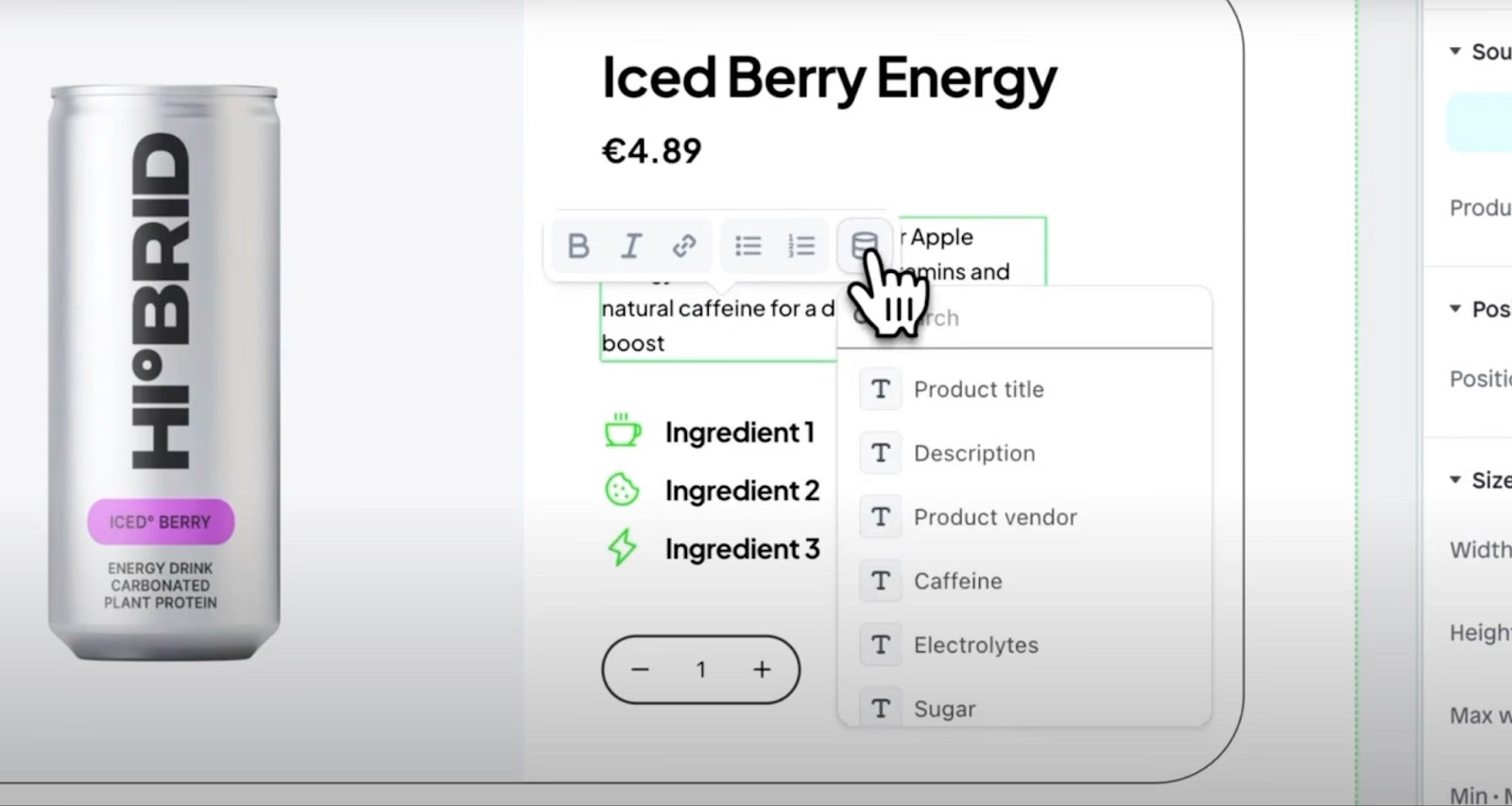
In the example above, you can see how this works in practice. Ingredient 1, Ingredient 2, Ingredient 3. Caffeine. Electrolytes. Sugar. Each one is its own field — queryable, editable, and displayable exactly where and how you want it on the page.
Why this matters for conversion
Your product description has one job: remove doubt and create confidence. The faster a customer can find the information they need, the faster they can decide to buy.
Metafields let you organize that information in a way that actually serves the buying decision. Instead of a paragraph of text that a customer has to read and interpret, you have clean, structured facts. Ingredients are listed. Materials are named. Usage is explained. Questions are answered before they're asked.
For mission-driven brands especially, this matters enormously. Your customers care about what's in your product. They care about where it's made, how it's sourced, what certifications it holds. That information is part of why they're choosing you over a cheaper alternative. Don't make them dig for it.
How to set them up in Shopify
The good news is that Shopify has made metafields genuinely accessible since the introduction of Online Store 2.0. You don't need a developer to create them anymore.
Here's how to get started:
Go to your Shopify admin → Settings → Custom data → Products. From there you can create custom metafield definitions — things like "Ingredients," "Materials," "Care Instructions," "Certifications," whatever your product needs. Give each one a name, choose the content type (single line text, multi-line, list, etc.), and save it.
Once your definitions are created, you'll see those fields available when you edit any product. Fill them in per product, and then connect them to your theme. In a 2.0 theme you can do this directly in the theme editor by connecting a block to a metafield source — no code required. If your theme is older or more custom, a developer can add the metafield output to your product template in an afternoon.
What to add first
Not sure where to start? Here's what makes the biggest impact for most product pages:
Ingredients or materials — especially important for food, beauty, wellness, and apparel brands. Customers want to know exactly what they're putting in or on their bodies, and what they're wearing. Make it easy.
Care or usage instructions — reduces returns, reduces customer service queries, and increases satisfaction. A customer who knows how to use your product correctly is a customer who leaves a good review.
Certifications and sourcing — organic, fair trade, B Corp, woman-owned, BIPOC-led — if you have credentials that matter to your customer, they should be on the product page, not buried in the About section.
Sizing or fit notes — if you sell apparel or anything size-dependent, structured sizing information on the PDP is one of the highest-ROI additions you can make.
The bottom line
A product page that answers every question before the customer thinks to ask it is a product page that converts. Metafields are how you get there — without cluttering your description, without overwhelming the design, and without a custom development project.
This is one of those Shopify features that takes an afternoon to set up and pays off every single day after that. Add them.